Start where you are
Keep a local plan without creating an account. Built-in habits and local protection keep working offline.
 Habit Protector
Make your next app opening count. Block distractions until you finish a habit you chose — a breath, a little movement, or a moment to reflect.
Android pre-registration is open. Apple launch is in preparation.
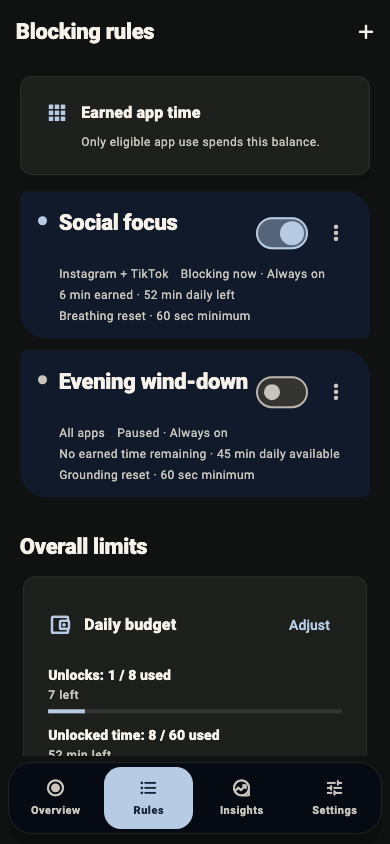
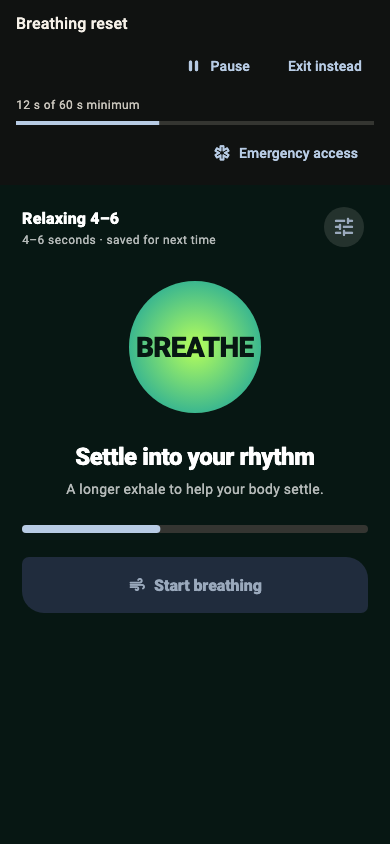
Pick the apps you open on autopilot. Protect them now, all day, or on a schedule.
Choose breathing, grounding, movement, reflection, or a timer for your own habit.
Complete the goal. Your rule grants access, and you choose whether to use it.
Keep a local plan without creating an account. Built-in habits and local protection keep working offline.
Pro adds shared rules and supported sync across up to five of your own devices. Choose the apps locally on each device.
Set a recurring schedule, daily limits, and an earned access window that suits the habit you want to build.
Emergency Access gives you a local pause when you need one. Adjust your rules as your days change.
Permission setup and available habits differ by device. Here is what to expect.
You can start without an account. Selected app names and native identifiers stay on your device. Account sync is optional.
Technical crash reports help us fix errors. Account, purchase, security, and sync services process the information needed to work.
Read what we collectChoose apps, choose a habit, and set a rule. When protection is active, finish your habit in Habit Protector to earn the app access your rule allows.
Yes. Set up local protection without signing in. Local rules and built-in habits work offline after setup. Purchases, account sign-in, and syncing between devices need internet.
Pro adds shared rules and supported sync across up to five of your own devices. Select the apps to protect on each device. Features depend on the platform; the app shows current monthly and yearly plans and local prices.
No. There are no ads or behavioral analytics. App matching happens locally. Optional account sync and technical crash reporting process data as described in the Privacy Policy.
The first store launch is being prepared for Android phones, iPhone, iPad, and Mac. Android pre-registration is open; Apple pre-orders are in preparation. Windows is coming soon.
Practical guides to interrupt scrolling, choose a blocker, and set rules you can live with.
A practical five-step plan: notice the trigger, choose one app, put a small habit before it, and review what worked.
Know which app-blocking features should work offline and which need internet for purchases, sign-in, or sync.
Understand shared rules, local app selection, offline devices, and the Pro setup before connecting your screens.
Compare scheduled blocks, pauses, habit goals, platform support, and offline behavior before choosing an app blocker.
Start with a boundary that is yours.